注釈
最後まで をクリックすると完全なサンプルコードをダウンロードできます。
2.6.8.16. Denoising an image with the median filter
This example shows the original image, the noisy image, the denoised one (with the median filter) and the difference between the two.
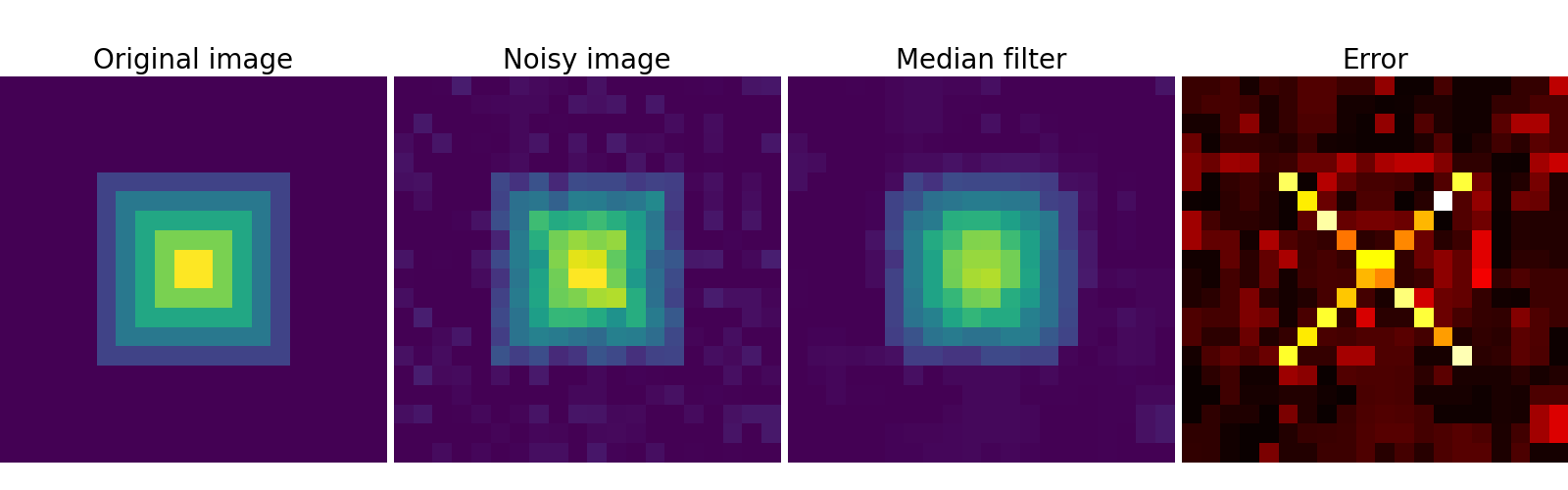
import numpy as np
import scipy as sp
import matplotlib.pyplot as plt

rng = np.random.default_rng(27446968)

im = np.zeros((20, 20))
im[5:-5, 5:-5] = 1
im = sp.ndimage.distance_transform_bf(im)
im_noise = im + 0.2 * rng.normal(size=im.shape)

im_med = sp.ndimage.median_filter(im_noise, 3)

plt.figure(figsize=(16, 5))

plt.subplot(141)
plt.imshow(im, interpolation="nearest")
plt.axis("off")
plt.title("Original image", fontsize=20)
plt.subplot(142)
plt.imshow(im_noise, interpolation="nearest", vmin=0, vmax=5)
plt.axis("off")
plt.title("Noisy image", fontsize=20)
plt.subplot(143)
plt.imshow(im_med, interpolation="nearest", vmin=0, vmax=5)
plt.axis("off")
plt.title("Median filter", fontsize=20)
plt.subplot(144)
plt.imshow(np.abs(im - im_med), cmap="hot", interpolation="nearest")
plt.axis("off")
plt.title("Error", fontsize=20)


plt.subplots_adjust(wspace=0.02, hspace=0.02, top=0.9, bottom=0, left=0, right=1)

plt.show()
Total running time of the script: (0 minutes 0.087 seconds)